

Listening to a podcast is an experience. Great audio enhances that experience. Bad audio will send your audience running, no matter how great the conversation. Podcasters need to examine how inviting and accessible their podcast’s sound quality is. A big factor in a podcast’s audio quality is the microphone that is being used to record the sound in the first place
Picking the best microphone for podcasting can be overwhelming. If you’ve ever started the process on Google or Amazon, you know there are about 3 billion different options out there. Spotting the differences between them can present a challenge if you don’t know what to look for. To help you improve the way your podcast sounds, we’ll first discuss the types of microphones and then which ones we like best.
We like to say that there is no “best” microphone. However, there is the best microphone for your podcast recording style and space. If you’d rather skip our in-depth discussion of the different microphones and how they work, you can skip to our microphone recommendations below.
Do You Need a Special Microphone for Podcasting?
You may be wondering if you even need a special microphone for podcasting. Your laptop has a built-in microphone and your phone has a headset jack – is that enough? Bluntly, no it isn’t.
Your phone and laptop are communication devices not recording devices. Trying to use them to record a podcast with good audio would be like talking into a drive-thru speaker and being shocked when it didn’t sound crystal clear.
That being said, no one microphone works perfectly in every possible scenario. A microphone is a tool that picks up whatever sound is in your environment. With that in mind, the type of microphone you need for your podcast will depend on your situation, especially your recording room.
READ MORE: Podcast Gear Checklist
READ MORE: Selecting a Podcast Recording Room
This post is based on podcast host Casey Cheshire’s conversation with podcast producer Liam Gousios on Creating The Greatest Show, a podcast about podcasting.
Picking Your Podcast Microphone: USB vs XLR
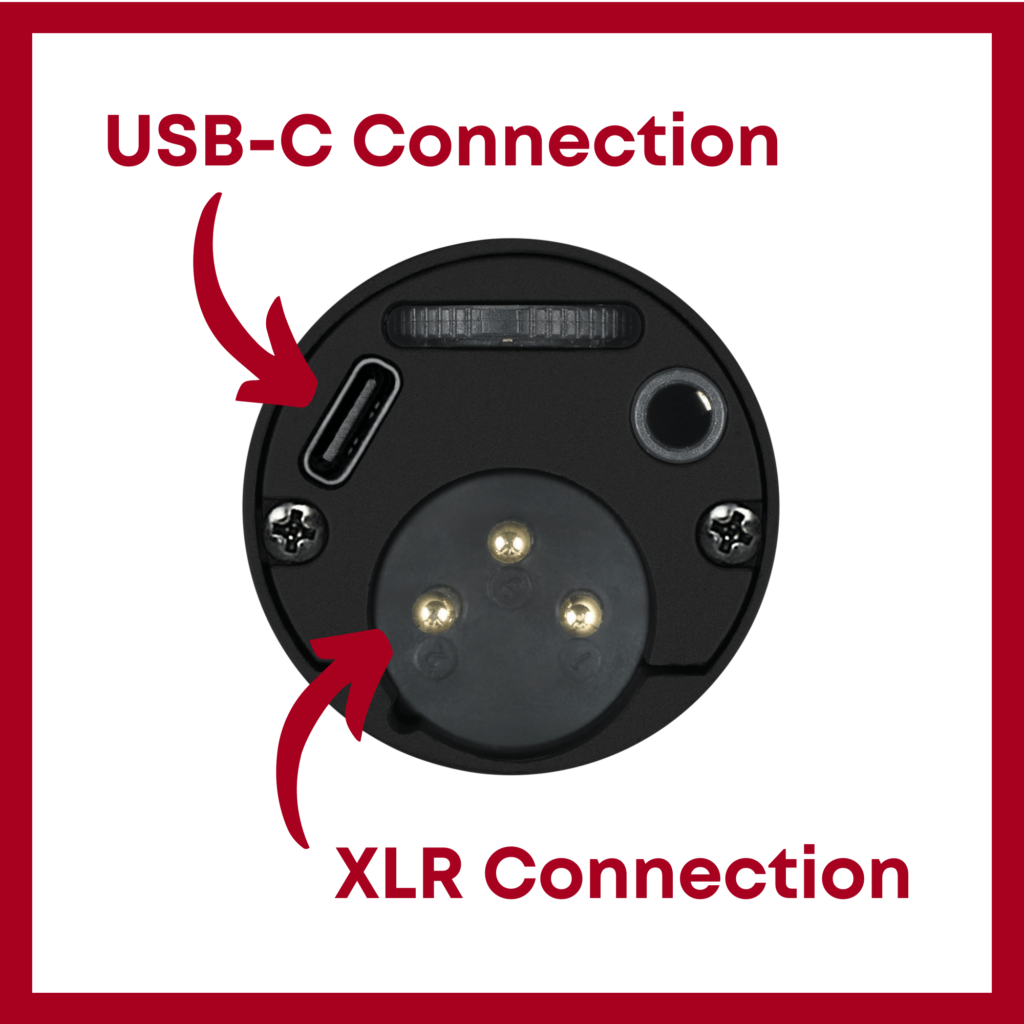
What does USB or XLR even mean? In short, these are how you will connect your microphone to your recording device. The two microphone connection types you’ll see are USB and XLR. Generally speaking, USB microphones are easier to use, while there is a greater selection of XLR microphones. Some podcast microphones have both connection options available.
What is a USB Microphone?
A USB microphone uses a cable that runs directly from your microphone to your computer. These microphones have onboard circuitry that converts the analog sound that it picks up into a digital signal which is then sent to your computer. USB microphones generally use either a micro-USB or USB-C cable to connect to your recording device.
USB microphones offer a simple setup, think “plug and play”. They are also typically more budget-friendly than XLR mics. However, the sound quality of some USB microphones can be lower than XLR options.
What is an XLR Microphone?
An XLR microphone uses a separate interface to connect your microphone and your computer. This added interface receives the analog sound from your microphone and transforms it into a digital audio signal and sends it to your computer. If you are using a separate recording device for in-person recordings, you can plug XLR mics directly into some devices, such as the Zoom H5.
There are many options out there for your interface and you can choose based on your need. One of the simplest audio interface options is the Scarlett 2i2 from Focusrite.
While the setup process has a few more steps, XLR microphones can give you better sound quality than a USB microphone. If you ever record with several people in the same space, XLR microphones and their interfaces are a great choice. Price-wise, XLR microphones come at a higher price tag compared to most USB mics. They are also not as portable as a USB mic.
Choosing Between a USB and XLR Microphone
When making your final decision you need to think about your specific recording situation. If you’re planning on interviewing a few people at a trade show right on your laptop, a USB microphone may be the better option. However, if you are setting up a room for a large group to all record together with separate microphones, you’ll want an XLR microphone and audio interface.

Condenser Microphone vs Dynamic Microphone
Now that you’ve chosen between USB and XLR, it’s time to make another podcast microphone choice. This decision should be based largely on your recording environment and the level of background noise that could be picked up. The two most common types of recording capsules are condenser microphones and dynamic microphones.
Pros and Cons of Condenser Microphones
- More sensitive recording sound that is clear and crisp
- Great for studio or quiet recording spaces
- Picks up more background noise if your recording space isn’t quiet
- Can be more fragile
- Tend to be more expensive
Pros and Cons of Dynamic Microphones
- More rugged and durable
- Less expensive
- Picks up less background noise
- Can make your voice sound more mellow or dark
Deciding between Dynamic and Condenser Microphones
As with most things in audio, choosing the right mic for you will come down to your specific recording scenario. Many condenser mics need an external power source whereas dynamic mics usually don’t. If you’re in a very quiet room that’s been treated for sound quality, you can probably achieve good results using a condenser microphone. However, if you record outside or at conventions with many people around, you’d probably be better off with a dynamic microphone.

READ MORE: Tips to Improve Podcast Sound Quality in Your Recording Space
Podcast Microphone Recommendations: Ringmaster’s Top 3
1. Under $100: Audio-Technica ATR2100x-USB

The ATR-2100 is the go-to microphone for new podcasters. This dynamic microphone is super easy to use and provides you with great, professional-sounding audio. It also happens to be the microphone that we recommend most often when people ask us what they need for their podcast. At under $100, it’s a great, budget podcast microphone that still delivers good sound.
Connection Type: Both USB and XLR
Capsule Type: Dynamic
2. Under $500: Shure SM7B

If you have ever listened to a podcast, there’s a chance the hosts were using a Shure SM7B to record their audio. This is one of the most commonly-used microphones in podcasting and for good reason. This model from Shure delivers stellar sound quality. Don’t forget that you’ll need to budget for and buy an audio interface to use this microphone’s XLR connection.
- Connection Type: XLR
- Capsule Type: Dynamic
3. Over $1000: AKG C414 XLS

The AKG C414 XLS will take your podcast sound quality further than any other microphone when used in the right environment. If you have an amazing recording room with very little background noise and a large budget available, this is one of the best podcast microphones you could find.
- Connection Type: XLR
- Capsule Type: Condenser
You may notice that we don’t list a Blue Yeti microphone on our list. We know that this mic is frequently recommended for podcasters but in our experience, we didn’t love the sound quality and found that there were better options for less money.
Podcast Microphones and Pressing Record
At the end of the day the best podcast microphone is the one you use! If buying an expensive mic will leave you anxious about actually using it, start with a cheaper one. Don’t let your sound be a barrier to recording your first show. Feel like you can’t decide? Record some test audio and have a friend or family member listen to it. They’ll let you know if there’s anything funky with the sound. Be sure to check return policies before purchasing.
READ MORE: How to Set up Your Microphone
Getting Your Microphone Set Up
Microphones are an important part of your podcasting setup, but they are just one part of your setup. Head over to our checklist to find all the podcast gear you need to get your podcast started.
Now that you’ve got your mic you may want some help setting it up, and we’re happy to help you. Just book a call with our team!